Series note: This post is part of my AI ABAP development series, where I go from AI development in general, to ABAP-specific problems, and then to ARC-1.
In the previous post, I introduced ARC-1 as a secure ADT MCP gateway for ABAP systems. The main point was not only that ARC-1 can expose ABAP development functionality to AI clients. The main point was that this access needs a place in the architecture.
This post is about that place. If ARC-1 should not run uncontrolled on every developer laptop, then SAP BTP is the most natural enterprise option for me. Not because BTP makes the problem disappear, but because it already has the pieces you need for this kind of setup: XSUAA, destinations, Cloud Connector, role collections, audit logging, and the normal BTP operating model.
This is not a full setup guide. The exact commands are in the ARC-1 deployment docs, the BTP deployment guide, and the pages for XSUAA, destinations, and Principal Propagation. Here I want to explain the architecture options and what I would look at first.
Why BTP
The problem with agentic ABAP development is not only context. It is controlled context. The AI needs to read real SAP objects, but the company also needs to know who is authenticated, where credentials live, what the effective permission is, and who can later audit what happened.
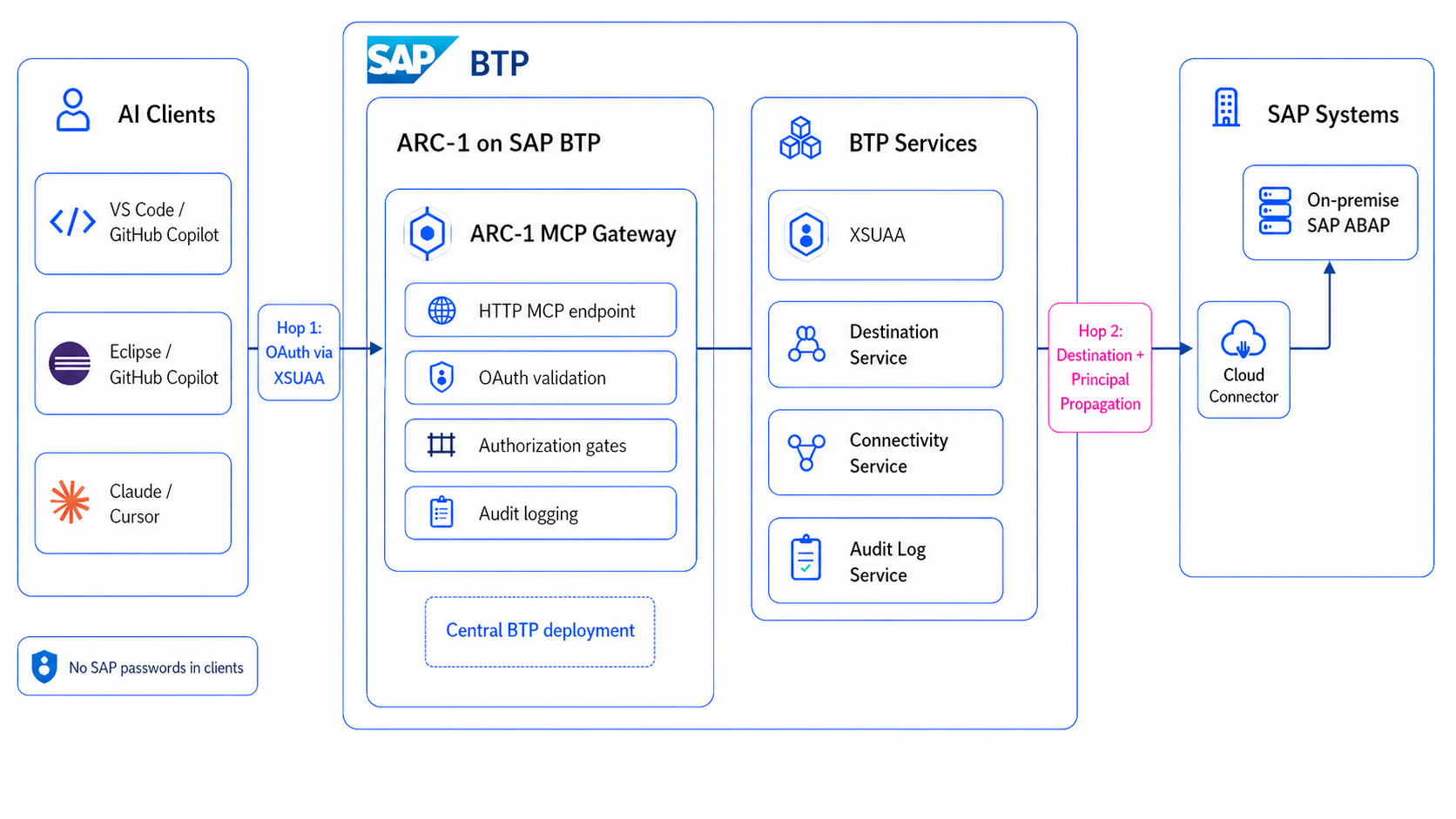
That is where BTP helps. ARC-1 can run as one central Cloud Foundry application instead of many local MCP servers. The SAP connection can use BTP destinations. On-premise and private cloud systems can be reached through Cloud Connector. Users can authenticate through XSUAA. Role collections can decide who gets read, write, data preview, SQL, transport, git, or admin scopes. If the BTP Audit Log Service is bound, ARC-1 can write audit events into the platform instead of only to a local laptop.
For me this is the real difference. A local setup is good for testing and for special cases, but it is not the architecture I would want for a real ABAP team. A central BTP deployment gives you one managed MCP endpoint per SAP system, one place for policy, and no need to store SAP passwords in every developer client.
The Basic Shape
The architecture still has the same simple shape:
MCP client -> ARC-1 -> SAP system
But on BTP this becomes two authentication hops:
AI client
  -> XSUAA OAuth
  -> ARC-1 on SAP BTP Cloud Foundry
  -> Destination Service
  -> Connectivity Service
  -> Cloud Connector
  -> SAP ABAP system
The first hop is the MCP client talking to ARC-1. A client like Claude, Cursor, VS Code, GitHub Copilot for Eclipse, MCP Inspector, or Copilot Studio calls the ARC-1 /mcp endpoint and authenticates through XSUAA. The second hop is ARC-1 talking to SAP. For that hop, ARC-1 can use a BTP destination with a technical user, a BTP destination with Principal Propagation, or a BTP ABAP Environment service key.
For human developer usage, Principal Propagation is the most interesting option. ARC-1 receives the user token, passes it to the Destination Service, and BTP plus Cloud Connector can propagate the user identity to the backend. Then SAP sees the real user instead of one shared technical account. That is important for authorization and for audit.
ARC-1 uses a dual-destination pattern for this:
SAP_BTP_DESTINATION      = shared BasicAuth destination
SAP_BTP_PP_DESTINATION   = per-user PrincipalPropagation destination
SAP_PP_ENABLED           = true
SAP_XSUAA_AUTH           = true
The BasicAuth destination is used for startup work like feature probing and cache warmup, because there is no user JWT at startup. The PrincipalPropagation destination is used for authenticated per-user requests. In production I would also look at SAP_PP_STRICT=true, because then a Principal Propagation problem fails clearly instead of silently falling back to a shared user.
The Three Gates
The important part is that ARC-1 does not rely on one big switch. A request has to pass three gates:
- The server ceiling: what this ARC-1 instance can ever do, configured with environment variables like
SAP_ALLOW_WRITES,SAP_ALLOW_FREE_SQL, orSAP_ALLOWED_PACKAGES. - The user permission: what this user can do inside ARC-1, coming from XSUAA role collections, OIDC scopes, or API-key profiles.
- The SAP authorization: what the SAP backend user can do, for example through
S_DEVELOP, package authorizations, transport authorizations, or ABAP Cloud restrictions.
That means the effective permission is an AND model:
Effective permission = server ceiling AND user permission AND SAP authorization
This is why BTP role collections and ARC-1 safety flags are not the same thing. If the server has SAP_ALLOW_WRITES=false, a user with ARC-1 Developer still cannot write. If SAP_ALLOW_FREE_SQL=false, a user with SQL scope still cannot run freestyle SQL. And even if both ARC-1 layers allow the action, SAP can still reject it.
Deployment Options
The recommended option is the MTA deployment. ARC-1 includes an mta.yaml with the Cloud Foundry app and the required services: XSUAA, Destination Service, and Connectivity Service. This is the most reproducible setup because the application and service bindings are described together, similar to how SAP describes multitarget applications for Cloud Foundry.
The rough commands are:
npm run btp:build
npm run btp:deploy
or combined:
npm run btp:build-deploy
Docker on Cloud Foundry is the second option. That can make sense if a company wants to deploy a pinned image from GHCR or an internal registry. You still need the same BTP services, but you manage more yourself with manifest.yml, cf create-service, cf bind-service, and cf set-env.
A direct Node.js buildpack deployment is also possible, especially if you patch or customize the source and push it directly with cf push. For a stable team setup, I would start with MTA unless there is a concrete reason not to.
BTP ABAP Environment is a separate scenario. There is no Cloud Connector involved. ARC-1 can use a service key and OAuth flow to connect to the ABAP environment. In this case SAP_SYSTEM_TYPE=btp matters, because ARC-1 adapts tool definitions and avoids on-premise-only object types and assumptions.
Configuration That Matters
This is not the full reference, but these are the variables I would explain first:
SAP_TRANSPORT=http-streamable
SAP_XSUAA_AUTH=true

SAP_BTP_DESTINATION=SAP_ECC_DEV
SAP_BTP_PP_DESTINATION=SAP_ECC_DEV_PP
SAP_PP_ENABLED=true
SAP_PP_STRICT=true

SAP_ALLOW_WRITES=false
SAP_ALLOW_DATA_PREVIEW=false
SAP_ALLOW_FREE_SQL=false
SAP_ALLOW_TRANSPORT_WRITES=false
SAP_ALLOW_GIT_WRITES=false
SAP_ALLOWED_PACKAGES='$TMP'
The first group makes ARC-1 a remote MCP server with XSUAA authentication. The second group controls the BTP destination setup and Principal Propagation. The third group is the server ceiling, and I would keep it conservative by default.
For a development system, you may open selected writes:
cf set-env arc1-ecc-dev SAP_ALLOW_WRITES true
cf set-env arc1-ecc-dev SAP_ALLOW_TRANSPORT_WRITES true
cf set-env arc1-ecc-dev SAP_ALLOWED_PACKAGES 'Z*,$TMP'
cf restage arc1-ecc-dev
For production, I would usually keep ARC-1 read-only:
cf set-env arc1-ecc-prod SAP_ALLOW_WRITES false
cf set-env arc1-ecc-prod SAP_ALLOW_FREE_SQL false
cf set-env arc1-ecc-prod SAP_ALLOW_DATA_PREVIEW false
cf restage arc1-ecc-prod
The recommended architecture is like the one-instance-per-SAP-system model. A DEV system can allow selected writes, a PROD system can be read-only, and a BTP ABAP system can have its own endpoint and tool behavior. This keeps policies easier to understand than one large multi-backend gateway.
Roles And Technical Users
ARC-1 ships XSUAA scopes like read, write, data, sql, transports, git, and admin. These are grouped into role collections such as ARC-1 Viewer, ARC-1 Developer, ARC-1 Developer + Data, ARC-1 Developer + SQL, and ARC-1 Admin.
For human developer usage, I would prefer XSUAA plus Principal Propagation. Then ARC-1 knows the MCP user, and SAP can also see the real SAP user. That gives a much better audit story.
But not every use case needs Principal Propagation. For automation, scheduled checks, process agents, or a very controlled BTP Process Automation scenario, a technical user can be fine. The tradeoff just has to be clear: ARC-1 may know which token or client called it, but SAP will see the technical user. With Principal Propagation, SAP sees the real user.
Connecting Clients
Once ARC-1 runs centrally, client configuration should become small. Ideally the developer configures only the MCP server URL, not SAP credentials:
{
  "mcpServers": {
    "arc1-ecc-dev": {
      "url": "https://arc1-ecc-dev.cfapps.eu10.hana.ondemand.com/mcp"
    }
  }
}
Clients with remote MCP and OAuth discovery can follow the XSUAA flow. ARC-1 exposes OAuth metadata and proxies the flow to XSUAA, so this can work for Claude, Cursor, VS Code-style MCP clients, and MCP Inspector.
For Eclipse this becomes more concrete with GitHub Copilot for Eclipse. Eclipse ADT can stay the normal ABAP development environment, while Copilot can use MCP to call the same central ARC-1 endpoint. GitHub also added MCP OAuth support for Copilot in Eclipse, JetBrains, and Xcode, so this fits the BTP/XSUAA endpoint model much better than a local server on every laptop. ARC-1 still does not replace Eclipse. It gives the AI part a controlled SAP access path.
What I Would Verify First
Before I would enable any write access, I would verify the boring things:
curl https://arc1-ecc-dev.cfapps.eu10.hana.ondemand.com/health
curl https://arc1-ecc-dev.cfapps.eu10.hana.ondemand.com/.well-known/oauth-authorization-server
Then I would test a read-only MCP call and check the ARC-1 logs. The logs should show which authentication modes are active, for example XSUAA on the MCP side and Principal Propagation on the SAP side.
Only after that I would enable writes, and only in steps:
read-only -> writes to $TMP -> writes to selected packages -> transport writes
This is less exciting than a demo where the AI writes everything immediately, but it is much closer to how I think enterprise ABAP AI development should be introduced.
Where To Go Deeper
The architecture is the important part first, but the actual setup has many landscape-specific details.
For the concrete steps, I would start with the BTP Cloud Foundry deployment guide, then go through XSUAA setup, BTP destination setup, and Principal Propagation setup depending on the target landscape.
For me the main point stays the same: ARC-1 on BTP is not just a nicer place to host a Node.js app. It is where the MCP server can become part of an enterprise SAP development architecture, with central access, controlled permissions, and a real identity story.
Discuss this post
References & links
- ARC-1 on GitHub
- ARC-1 Documentation
- ARC-1 Deployment
- ARC-1 BTP Cloud Foundry Deployment
- ARC-1 Enterprise Authentication
- ARC-1 XSUAA Setup
- ARC-1 BTP Destination Setup
- ARC-1 Principal Propagation Setup
- ARC-1 Authorization and Roles
- ARC-1 BTP ABAP Environment Setup
- SAP Help: Multitarget Applications in Cloud Foundry
- SAP Help: Authorization and Trust Management Service
- SAP Help: Authenticating Users Against On-Premise Systems
- SAP Cloud SDK: Destinations
- GitHub Copilot for Eclipse
- GitHub Changelog: Enhanced MCP OAuth support for Copilot in Eclipse, JetBrains, and Xcode